

The Analytics Fragmentation Problem
You manage social media presence across Instagram, TikTok, YouTube, LinkedIn, and Twitter. Each platform has its own analytics dashboard. Each defines metrics differently. Each requires separate logins, separate exports, and separate mental models. Your boss asks a simple question: “How did we perform last month?” You spend the next three hours:- Logging into five platforms
- Exporting CSVs with different column names
- Trying to reconcile why Instagram calls it “Reach” and LinkedIn calls it “Unique Impressions”
- Building a spreadsheet that’s outdated the moment you finish it
What Is a Social Media Analytics API?
A social media analytics API is a programmatic interface that lets you pull performance metrics from social media platforms. Instead of manually checking dashboards or exporting CSVs, you make API calls and receive structured data. At its simplest:- Automation: Pull metrics programmatically on a schedule, no manual work
- Aggregation: Combine data from multiple platforms into unified reports
- Historization: Store historical data that platforms often don’t preserve long-term
- Normalization: Translate platform-specific metrics into comparable formats
Why Platform-Native Analytics Aren’t Enough
Every social platform offers some form of analytics. Instagram has Insights. TikTok has Analytics. YouTube has Studio. So why would you need an API?1. Manual Access Doesn’t Scale
If you manage one account, native dashboards work fine. If you manage 10 accounts across 5 platforms, you’re spending hours on data collection that should be automated.2. Data Retention Is Limited
Most platforms only retain detailed analytics for 30-90 days. If you need to compare this January to last January, that data is gone unless you’ve been exporting it.3. Cross-Platform Comparison Is Painful
Try comparing “engagement rate” across platforms. Instagram calculates it one way. LinkedIn calculates it another. TikTok doesn’t even provide it directly - you have to compute it yourself. Without normalization, you’re comparing apples to oranges.4. Building Features Requires APIs
If you’re building a SaaS product, a client dashboard, or an internal reporting tool, you can’t tell users to “just check Instagram manually.” You need programmatic access.5. Executive Reporting Needs Aggregation
Leadership doesn’t want five separate reports. They want one dashboard that shows total reach, total engagement, and growth trends across all channels.The Challenge: Every Platform Is Different
Before diving into solutions, you need to understand the problem. Each platform’s analytics API is its own world.Instagram (Graph API)
Available Metrics:- Profile: impressions, reach, profile views, website clicks, followers
- Posts: impressions, reach, likes, comments, saves, shares (Reels only)
- Stories: impressions, reach, exits, replies, taps forward/back
- Reels: plays, reach, likes, comments, shares, saves
- Follower breakdown by country, city, age, gender
- Engaged audience breakdown (who interacted this month)
- Follows/unfollows over time
- Story metrics available only for 24 hours after story expires
- Demographics require Business/Creator account
- 30-day rolling window for most historical data
TikTok (Business API)
Available Metrics:- Profile: video views, followers, profile views, likes (total)
- Videos: views, likes, comments, shares, watch time, completion rate
- Audience ages
- Audience cities
- Engaged audience breakdown
- Requires Business Account
- API approval process takes weeks
- Some metrics only available in aggregate (30-day windows)
YouTube (Data API v3)
Available Metrics:- Channel: views, subscribers, video count, estimated watch time
- Videos: views, likes, dislikes, comments, favorites, average view duration
- Viewer age groups
- Viewer gender
- Traffic sources
- Geography
- Quota system limits API calls (10,000 units/day default)
- Video upload costs 1,600 units - analytics calls cost less but add up
- Detailed demographics require YouTube Analytics API (separate)
LinkedIn (Marketing API)
Available Metrics (Personal):- Posts: impressions, unique impressions, reactions, comments, reshares
- Videos: video plays, viewers, watch time, completion rate, average watch time
- Page: page views, unique visitors, followers
- Posts: impressions, clicks, engagement rate, reactions, comments, shares
- Personal and company analytics are completely different APIs
- Rate limits are restrictive
- Historical data access is limited
Facebook (Graph API)
Available Metrics:- Page: page views, page impressions, followers
- Posts: impressions, reach, reactions (like, love, wow, haha, angry), comments, shares, saves
- Videos: views, unique views, average watch time, click-to-play
- Reels: plays, reach, reactions
- Organic vs. paid metrics are separate
- Video metrics differ significantly from photo/link posts
- Requires Page access tokens (more complex OAuth)
And That’s Just Five Platforms…
Pinterest has pin impressions, saves, and outbound clicks. Reddit has karma, upvotes, and comment counts. Threads has views, likes, reposts, and quotes. Google Business Profile tracks impressions across maps and search, plus calls and direction requests. Each platform:- Uses different terminology
- Measures things differently
- Has different API access requirements
- Returns data in different formats
What a Good Social Media Analytics API Should Provide
When evaluating social media analytics APIs, here’s what matters:1. Normalized Metrics Across Platforms
The API should translate platform-specific metrics into a consistent schema:| Normalized Field | TikTok | YouTube | ||
|---|---|---|---|---|
impressions | impressions | video_views | views | impressions |
impressionsUnique | reach | unique_views | (N/A) | unique_impressions |
likes | likes | likes | likes | reactions |
comments | comments | comments | comments | comments |
shares | shares | shares | (N/A) | reshares |
saves | saved | (N/A) | favorites | (N/A) |
followers | followers_count | followers | subscribers | followers |
2. Both Account-Level and Post-Level Analytics
Account-level (social account analytics):- Follower growth
- Total impressions/reach
- Overall engagement
- Profile/page views
- Per-post impressions, likes, comments
- Video-specific metrics (watch time, completion rate)
- Content performance comparison
3. Raw Data Access
Normalized data is great for dashboards. But sometimes you need the raw platform response - every field, exactly as the platform returned it. Why raw data matters:- Platform-specific metrics that don’t normalize well
- Debugging discrepancies between your data and native dashboards
- Future-proofing (if a new metric appears, raw data captures it)
- Custom calculations beyond standard normalization
4. Demographic and Audience Data
Beyond engagement metrics, you need to understand WHO your audience is: Demographics:- Age breakdown
- Gender breakdown
- Geographic distribution (country, city)
- Follower vs. engaged audience differences
- Audience growth over time
- Audience overlap across platforms
5. Historical Data Retention
Platforms often only keep 30-90 days of detailed analytics. A good analytics API should:- Store historical data long-term
- Let you query trends over months/years
- Preserve data even after platform retention expires
6. Automatic Refresh and Webhooks
Analytics data changes constantly. A good API should:- Automatically refresh metrics on a configurable schedule
- Support force-refresh when you need real-time data
- Send webhooks when significant changes occur
How bundle.social Handles Analytics
Let me walk you through what we’ve built. This isn’t just marketing - it’s the technical reality of our analytics infrastructure.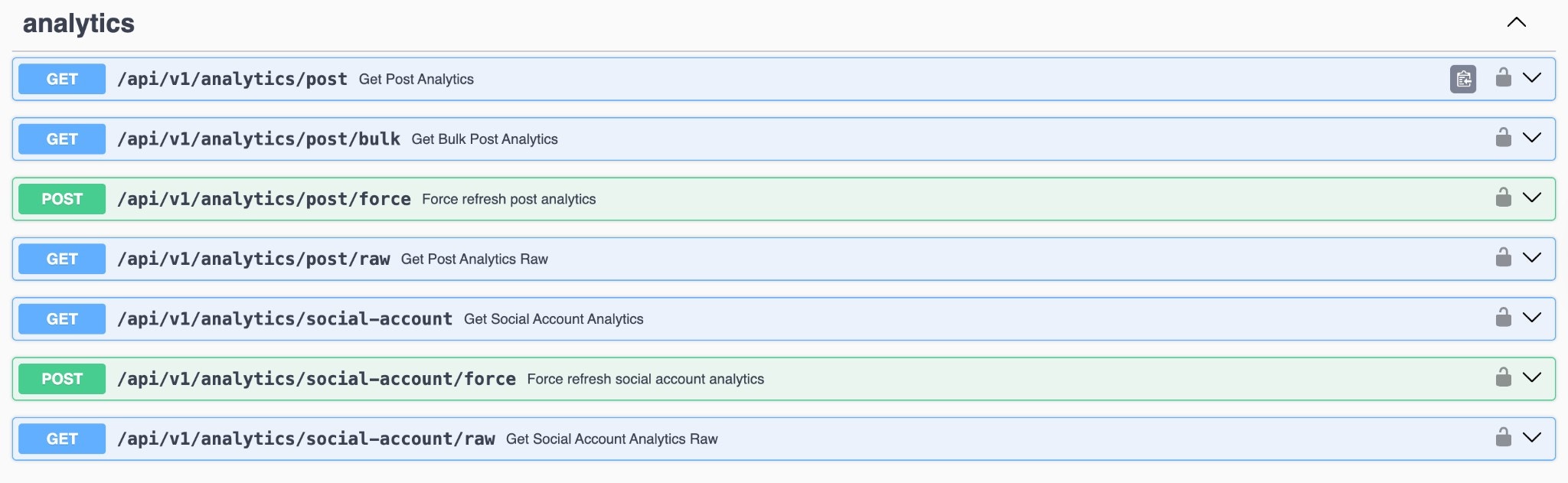
Platforms We Cover
We pull analytics from 11 platforms:- Instagram - full suite including demographics
- TikTok - account and video analytics with audience data
- YouTube - channel and video metrics
- LinkedIn - personal AND company page analytics
- Facebook - page and post analytics including Reels
- Threads - views, likes, replies, reposts
- Pinterest - impressions, saves, clicks
- Reddit - karma, upvotes, comments
- Google Business Profile - impressions, calls, direction requests
- Mastodon - followers, favourites, reblogs
- Bluesky - followers, likes, reposts
Normalized Schema
Every platform maps to our unified schema:Raw Analytics Storage
We store the complete, unmodified platform response alongside normalized data. When you need it:rawTiktokAnalyticsEnabled- store complete TikTok response including demographicsrawInstagramDemographicsEnabled- store follower demographics, audience splits, follows/unfollows
Instagram Demographics Deep Dive
When enabled, we capture Instagram’s full demographic breakdown: Follower Demographics:TikTok Audience Insights
When raw TikTok analytics are enabled:LinkedIn Video Analytics
LinkedIn provides rich video metrics that we capture:Bulk Analytics Retrieval
When you need analytics for many posts at once:Force Refresh
Platform analytics update on their own schedule. When you need real-time data:Configurable Refresh Intervals
Different use cases need different freshness:analyticsInterval- how often we automatically refresh account analyticsanalyticsPostsInterval- how often we refresh post analytics
Code Examples: Using the Analytics API
Get Account Analytics (Node.js)
Using our SDK:Get Post Analytics (Python)
Bulk Analytics for Reporting
Cross-Platform Comparison
Use Cases: What You Can Build
1. Client Reporting Dashboards
Agencies managing multiple clients can build automated reports:- Pull analytics for all client accounts nightly
- Generate weekly/monthly PDF reports
- Show cross-platform performance in one view
- Track trends over time
2. Content Performance Analysis
Compare how content performs across platforms:- Same video on TikTok vs. Reels vs. Shorts
- Which platform drives the most engagement?
- Optimal posting times per platform
- Content type performance (video vs. image vs. carousel)
3. Audience Intelligence
Use demographic data to understand your audience:- Age and gender breakdown per platform
- Geographic distribution
- Difference between followers and engaged audience
- Audience growth/churn analysis
4. Competitive Benchmarking
Compare your performance to industry benchmarks:- Track engagement rates over time
- Compare follower growth rates
- Identify high-performing content patterns
5. Automated Alerts
Build notification systems:- Alert when engagement drops below threshold
- Notify when a post goes viral (unusual spike)
- Weekly digest of top-performing content
- Follower milestone notifications
6. Executive Dashboards
Give leadership what they need:- Total reach across all platforms
- Month-over-month growth
- Top-performing content
- ROI metrics (when combined with campaign data)
Extending Analytics: What We Can Add
Our analytics foundation is built to expand. Current capabilities are extensive, but we’re continuously adding: Coming soon / available on request:- Sentiment analysis - Understanding comment sentiment at scale
- Hashtag performance tracking - Which hashtags drive reach
- Competitor analytics - Track public metrics for competitor accounts
- Custom metric calculations - Define your own engagement rate formulas
- Deeper video analytics - Second-by-second retention curves
- Audience overlap - Understanding follower overlap across platforms
Why Not Build It Yourself?
You could build direct integrations to each platform’s analytics API. Here’s why that’s usually a bad idea:Time Investment
| Platform | Analytics Integration Time |
|---|---|
| 30-40 hours | |
| TikTok | 25-35 hours |
| YouTube | 35-45 hours |
| 30-40 hours | |
| 25-35 hours | |
| Total | 145-195 hours |
Maintenance Burden
- Instagram Graph API changes quarterly
- TikTok deprecated their old API entirely
- LinkedIn’s analytics endpoints shift regularly
- You’re responsible for handling every breaking change
Data Normalization Is Hard
Getting “engagement” to mean the same thing across platforms requires:- Deep understanding of each platform’s metrics
- Careful mapping decisions
- Ongoing adjustment as platforms add/change metrics
Storage and Historization
Platforms don’t keep historical data forever. Building your own data warehouse adds:- Database infrastructure
- Data retention policies
- Backup and recovery
Getting Started
If you’re ready to stop wrestling with multiple analytics dashboards:API Documentation
Full API reference for analytics endpoints
GitHub Examples
Working code samples for analytics
Sign Up
Connect your accounts and start pulling analytics
The Bottom Line
Social media analytics shouldn’t require logging into five dashboards, exporting five CSVs, and spending hours in spreadsheets. A unified social media analytics API gives you:- One interface for all platforms
- Normalized data for easy comparison
- Raw data when you need the details
- Demographics to understand your audience
- Historical retention beyond platform limits
- Programmatic access for automation and reporting
Questions about specific analytics capabilities? Check our analytics beginner guide or reach out. We’re happy to discuss what’s possible.