
TL;DR
- Upload-Post: Simple social media API for basic posting needs.
- The Switch Triggers: Missing platforms, reliability concerns, vague errors, unpredictable pricing, or slow support.
- bundle.social Difference: 14+ platforms, 2% error rate, verbose error responses, analytics included, flat pricing, and support that responds same-day.
Why Developers Look for Upload-Post Alternatives
Upload-Post serves a purpose for straightforward use cases. It’s simple, it works for basic posting, and for some products that’s all you need. When developers start searching for alternatives, it’s usually because they’ve hit a wall somewhere. The most common friction points we hear:- Missing platforms. You need Discord or Bluesky or Threads, and they don’t support it. No timeline for adding it.
- Reliability concerns. Posts are failing at rates that make your product look bad. Debugging is difficult because error messages don’t tell you what actually went wrong.
- Pricing uncertainty. Usage-based billing makes budgeting hard, especially for products with variable volume.
- Support gaps. Something breaks, you reach out, and the response takes days. Or never comes.
Flat Pricing That Makes Sense
Usage-based pricing sounds fair in theory - pay for what you use. In practice, it creates anxiety. You find yourself adding artificial limits to your product to control costs. A customer success story where someone schedules 500 posts becomes a billing problem instead of a celebration. You’re checking dashboards instead of building features. bundle.social uses flat pricing. Pick a tier, that’s your cost.- Pro: $100/month for 1,000 posts, unlimited social sets
- Business: $400/month for 100,000 posts
2% Error Rate, Verbose Failures
Here’s a number we track obsessively: our error rate in production sits around 2%.According to Gartner, API reliability is a top concern for 73% of developers integrating third-party services.That means 98% of scheduled posts publish successfully, on time, to the right platform. The 2% that fail are almost always external factors:
- User revoked access (token expired)
- Platform rejected the content (policy violation)
- Platform itself is having issues (temporary outage)
- Specific error codes
- Clear messages explaining what happened
- Which platform caused the issue
- Whether retrying makes sense
This matters for your code and your sanity. Your error handling can make intelligent decisions: retry transient failures automatically, alert users when accounts need reconnection, skip posts that violate content policies. No guesswork, no blind retries.
Analytics Included
At paid tiers, you get analytics through the same API. Pull engagement data - likes, comments, shares, impressions, views - without integrating separately with each platform’s analytics API. We normalize the data so metrics are comparable across platforms. “Engagement” means the same thing whether it came from Instagram or LinkedIn. For products building reporting dashboards, this saves weeks of integration work. For products that just need posting, ignore it - but it’s there when your requirements grow.Support That Actually Helps
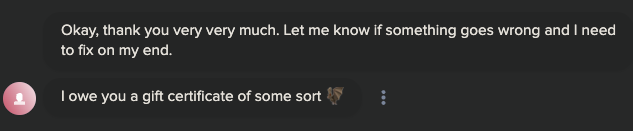
I’m not going to claim our support is “world-class” because every company says that. Here’s what I can promise concretely: When you reach out, a human responds. On weekdays, our average response time on chat is around 10 minutes. Weekends? We’re 🤙 chill 🤙 but we still check in. We know part-time entrepreneurs build in every free moment they have - evenings, weekends, holidays. If you’re grinding at 11 PM on a Saturday, we get it.
Features Built on Request
If you need something we don’t have, ask. We’ve added integrations, endpoints, and webhook events based on direct customer requests. Not everything is possible, and not everything ships immediately. But reasonable requests that fit the platform direction typically ship in weeks, not quarters. This is the advantage of working with a smaller provider. There’s no roadmap committee or quarterly planning cycle blocking responsiveness. If it makes sense and we can build it, we probably will.14+ Platforms
Current platform support: Major platforms: Instagram, Facebook, LinkedIn, Twitter/X, TikTok, YouTube, Pinterest Community platforms: Discord, Slack, Reddit Emerging networks: Mastodon, Bluesky, Threads Business: Google Business Profile If you’re building for community platforms or emerging decentralized networks, check whether your current API actually supports them. Many don’t.The Web App Bonus
Some APIs are API-only by design. bundle.social has a full web app alongside the API. For pure developer integrations, this might not matter. But for products where some users want a visual interface - agencies giving clients approval access, internal teams who prefer drag-and-drop scheduling, stakeholders who want to see what’s queued - having a web app means you don’t have to build one. Everything in the web app is also in the API. It’s not either/or. The web app is just there if you need it.When to Switch
Switch if:- Your current API’s pricing model creates budget problems
- You’re experiencing reliability issues you can’t debug because errors are vague
- Support is unresponsive when you need help
- You need platforms that aren’t supported
- You need analytics and don’t want to integrate multiple APIs
- Everything works fine
If you’re actively evaluating, check the docs, try the free tier, and see if the reliability, error verbosity, and support claims hold up in practice.
API Documentation
Full API reference with interactive examples
Code Examples
Ready-to-use implementations
TypeScript SDK
SDK for faster development
The switch should be based on your specific experience, not our marketing. See if we’re actually better for your use case.