
TL;DR
- What is it? A Social Media API is the secure pipe that lets apps (like schedulers) talk to platforms (like Instagram or LinkedIn) to automate posting and pull data.
- How does it work? It’s a 5-step dance: Register App → OAuth (Login) → Request Scopes (Permissions) → API Calls → Webhooks.
- The Catch: It’s not magic. You have to deal with rate limits, token refreshing, and the fact that “engagement” means something different on every platform.
- Is it safe? Yes, if implemented correctly using OAuth tokens (valet keys) instead of passwords.
What is a Social Media API? (And Why You Should Care)
You’ve likely searched for “what is api in social media” because you’re tired of copy-pasting the same image into five different browser tabs. We get it. At its core, a social media API (Application Programming Interface) is a set of rules that allows different software applications to talk to each other. It’s the engine behind social media api integration tools that let you:- Post content automatically (write once, publish everywhere).
- Pull analytics (get all your likes/views in one dashboard).
- Listen to mentions (customer support bots).
400 Bad Request.
How Integration Actually Works (The 5-Step Reality)
Most social media scheduling api integration guides skip the messy middle. Here is the actual flow we use in production at bundle.social:1. Pick Your Battles (Platform Selection)
You decide which social networking API you need:2. Create the App
You go to the developer portal (e.g., Meta for Developers), register your app, and get a Client ID and Client Secret. Treat that secret like your banking password.3. The OAuth Dance (Connect)
This is the “Login with Facebook” part. You redirect the user to the platform. They click “Allow.” We’ve built a complete guide on how to connect social accounts that covers both the easy hosted flow and custom UI implementation.4. Scope It Out
You don’t just ask for “access.” You request specific scopes (permissions).- Good:
pages_manage_posts(Let me post to your page). - Bad:
pages_messaging(Let me read your DMs - don’t ask for this unless you really need it).
5. Handle the Token
If the user says yes, the platform sends you a “Token.” You store this securely. This token is what you send with every future request to say, “Hey, it’s still me, let me post this.”Safety First: Is It Actually Secure?
You’ll hear people ask, “is api social media safe?” or worry about social media api integration risks. The verdict: APIs are significantly safer than the alternative (sharing passwords), but safety depends on implementation. When you use a social media integration api, you are using a token-based system (OAuth).- No Passwords: You never see or store the user’s actual Instagram password.
- Granular Access: Remember the scopes? You can grant an app permission to post content without giving it permission to delete your account.
- Revocability: If a tool acts sketchy, the user can revoke access in their social settings instantly. The token dies, and the app is locked out.
passwords.txt (please don’t), that’s on you. Compliance is a shared responsibility.
The “Gotchas”: Real Constraints Marketers Hate
We value radical transparency here. Integrating enterprise social media platforms api integration isn’t always sunshine and rainbows. Here are the constraints we fight daily:Rate Limits
Platforms limit how many requests you can make. If your social media analytics api tries to pull data 500 times a second, Twitter will put you in “API Jail” (timeout) for 15 minutes. Check out our rate limits documentation to understand the daily posting limits per platform.The Review Process
Before your app can go live to the public on Instagram or TikTok, a human at those companies has to review a video of you using the app. It can take weeks (or months and 43 tries, don’t ask how I know).Restricted Endpoints
Some things just aren’t possible via API. For a long time, you couldn’t post Instagram Reels automatically. APIs lag behind the actual apps.Data Retention
Platforms like Facebook have strict rules on how long you can store user data. You can’t just hoard analytics forever without refreshing consent.The Analytics Mismatch (Why Your Numbers Look Weird)
If you’re looking for the best search apis for social media analytics, be warned: Math is hard. A social media analytics api returns raw data: impressions, reach, engagement_rate. But every platform defines these differently.- LinkedIn might count a “view” after 3 seconds.
- TikTok might count it instantly.
- Facebook might have a totally different metric called “3-second video plays.”
A Concrete Example: How It Looks in Code
Let’s say you want to use a social media api integration in Node.js (or PHP, Ruby, whatever - the logic is the same). Here is a pseudo-code example of what a “Post to LinkedIn” request actually looks like in the backend:Our API: Post and Analytics Endpoints
Here’s what a real social media API looks like under the hood. This is our Swagger documentation showing the post and analytics endpoints: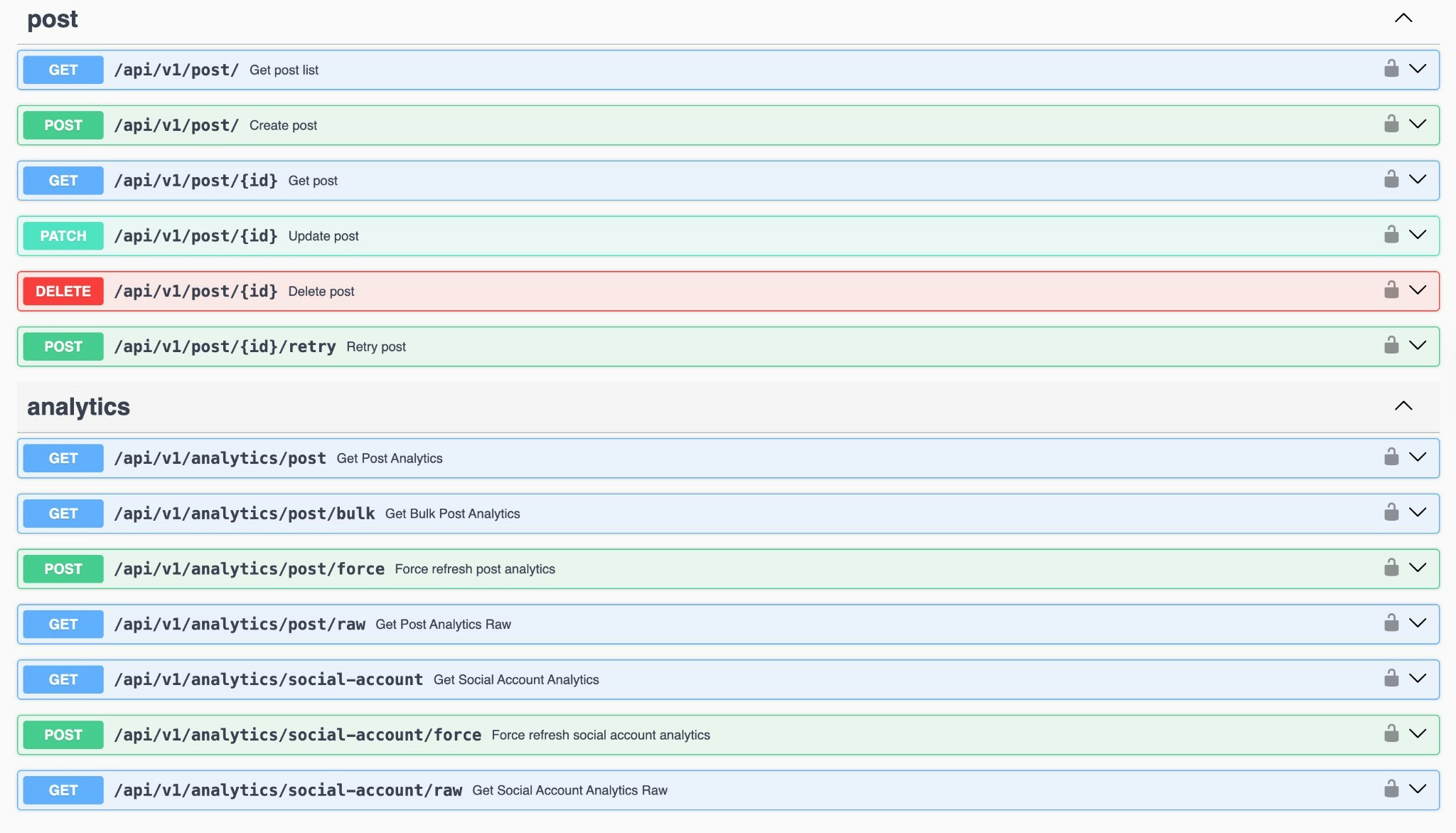
What’s Next?
Now that you understand how to integrate marketing platform with social media apis, you have two choices:1. The DIY Route
Go read the documentation for Facebook, LinkedIn, Twitter, TikTok, and YouTube. Handle the OAuth tokens, fight the rate limits, and build the normalize layer yourself. (Great if you love pain).2. The Smart Route
Use a unified API or a tool that aggregates this for you. If you are a developer looking for social media api integration best practices, check out our examples on GitHub to see how we handle the messy stuff. You can also use our TypeScript SDK to skip the boilerplate entirely.Want to skip the headache entirely? We’ve spent months perfecting these integrations at bundle.social so you can focus on your product, not maintaining 15 different API connections.
Check out our API documentation
Full API reference with interactive examples
GitHub Examples
See working code examples for common use cases