Documentation Index

Fetch the complete documentation index at: https://info.bundle.social/llms.txt

Use this file to discover all available pages before exploring further.

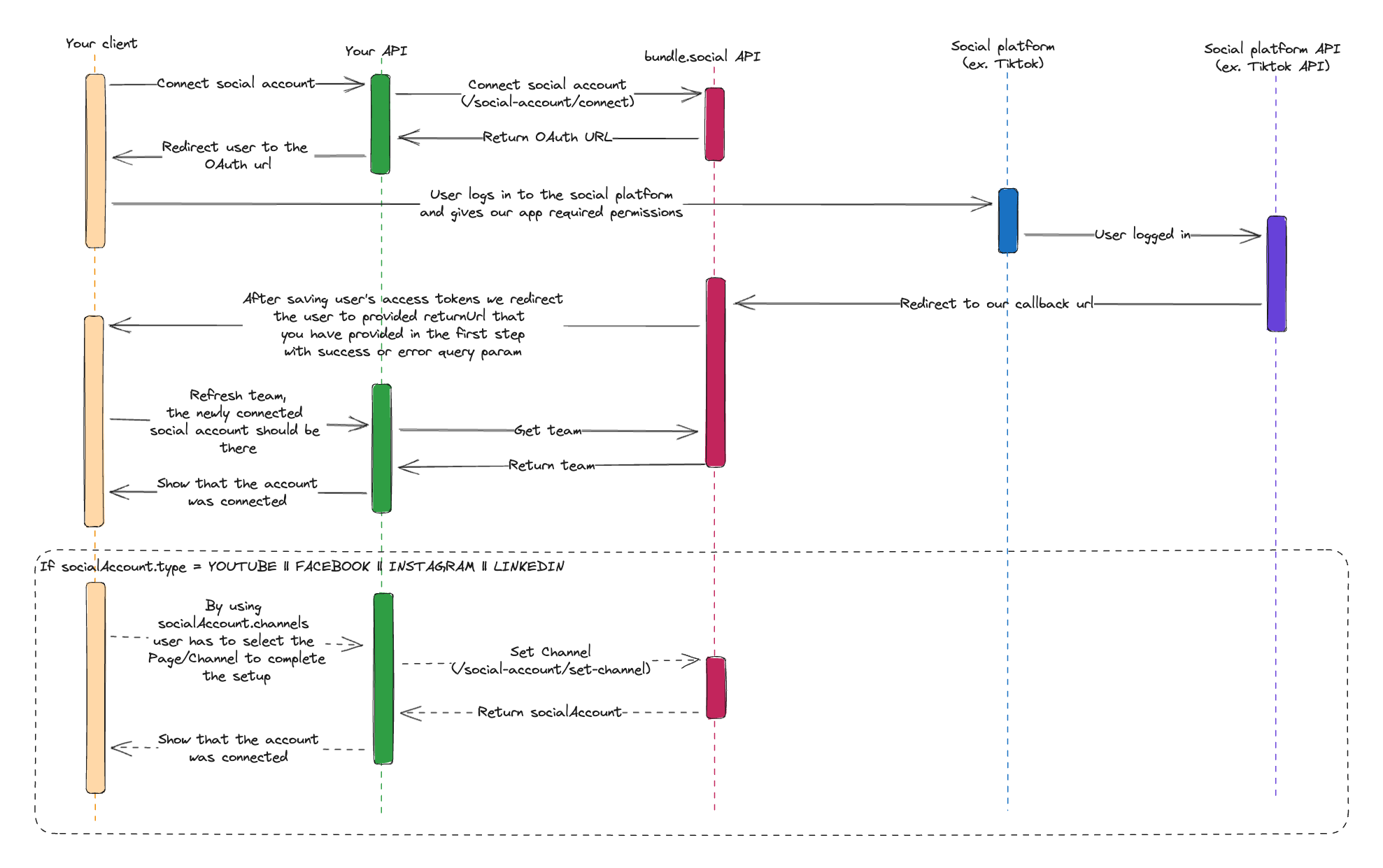
Use custom UI when you want full control over account connection screens. You generate an OAuth URL, redirect the user, handle the callback, fetch the saved social account, and call channel endpoints when a platform needs a selected target. Endpoint: POST /api/v1/social-account/connect Test it in Swagger or the API Reference Client.
{
  "type": "INSTAGRAM",
  "teamId": "team_123",
  "redirectUrl": "https://app.example.com/oauth/callback",
  "instagramConnectionMethod": "FACEBOOK",
  "disableAutoLogin": true,
  "withBusinessScope": true
}
Response:
{
  "url": "https://www.facebook.com/v..."
}
Redirect the user to url.

Connect Body

These are the available body fields for the custom flow.
FieldRequiredDescription
typeYesPlatform to connect. See Supported Types.
teamIdYesTeam that should receive the connected social account.
redirectUrlYesHTTP/HTTPS URL where the platform sends the user after OAuth. We append callback query parameters to this URL.
serverUrlDependsRequired for Mastodon. Optional issuer/server URL for Bluesky.
disableAutoLoginNoAdds provider-specific flags to avoid automatic login or silent account reuse where supported. Defaults to false.
forceBrowserOAuthNoInstagram direct OAuth only. Forces browser OAuth on phones where possible. Defaults to false.
instagramConnectionMethodNoInstagram only. Use FACEBOOK or INSTAGRAM. If omitted, the Facebook login path is used.
withBusinessScopeNoFacebook and Instagram via Facebook only. Adds broader Meta business scopes when true. Defaults to false.

Supported Types

TIKTOK, YOUTUBE, INSTAGRAM, FACEBOOK, TWITTER, THREADS, LINKEDIN, PINTEREST, REDDIT, MASTODON, DISCORD, SLACK, BLUESKY, GOOGLE_BUSINESS

Platform-Specific Options

OptionApplies toNotes
serverUrlMastodon, BlueskyMastodon requires it. Bluesky can use it for a custom issuer/server.
instagramConnectionMethod: "FACEBOOK"InstagramUses Facebook Login and supports Page/account channel selection, comments, insights, locations, and Instagram audio search.
instagramConnectionMethod: "INSTAGRAM"InstagramUses direct Instagram OAuth. No set-channel, unset-channel, or refresh-channels. Some Facebook-backed features are not available.
disableAutoLoginFacebook, Instagram via Facebook, Instagram direct OAuth, TikTokHelps users pick the correct platform account when many accounts are used in one browser.
forceBrowserOAuthInstagram direct OAuthAvoids the Instagram iOS app deep-link path when possible.
withBusinessScopeFacebook, Instagram via FacebookCan expose Pages and Instagram accounts that are hidden in the standard Meta scope flow.
For Facebook and Instagram via Facebook, ask users to select all Pages and Instagram accounts they manage in Meta OAuth. Then call set-channel for the one target this team should use.

Basic Flow

  1. Call POST /api/v1/social-account/connect.
  2. Redirect the user to the returned url.
  3. Handle the callback query parameters on your redirectUrl.
  4. Fetch the social account with GET /api/v1/social-account/by-type.
  5. If socialAccount.channels contains selectable targets, show them in your UI.
  6. Call POST /api/v1/social-account/set-channel when required.
Connect social account flow

Fetch The Connected Account

Use this after the callback to inspect the connection and available channels. Endpoint: GET /api/v1/social-account/by-type Query:
FieldRequiredDescription
typeYesPlatform type.
teamIdYesTeam ID.
GET /api/v1/social-account/by-type?type=FACEBOOK&teamId=team_123
If the platform needs channel selection, read socialAccount.channels and call Set Channel.

Helper Endpoints

These endpoints are useful in a full custom UI.
EndpointMethodUse
/api/v1/social-account/disconnectDELETEDisconnect a social account from the team. This also removes it from scheduled posts.
/api/v1/social-account/set-channelPOSTSelect a Page, channel, organization, or location after OAuth.
/api/v1/social-account/unset-channelPOSTClear the selected channel while keeping the OAuth connection.
/api/v1/social-account/refresh-channelsPOSTRefresh available targets saved in socialAccount.channels.
/api/v1/social-account/connection-checkPOSTManually check whether a connected account is still valid. Requires a selected channel/account where the platform needs one.
/api/v1/social-account/profile-refreshPOSTManually refresh profile information for a connected social account.
/api/v1/social-account/by-typeGETFetch the connected social account for a team and platform.
Channel details live in Channel Management. Callback query parameters live in Callback Parameters.